

📦 Rundoo Primer: Partial Closeouts and Pricing by Region
Close out special orders one piece at a time, set different prices by region, and skip the note on returns.

Summary
This week’s Primer has two big updates and one small but handy one.
First, you can now close out part of a special order whenever you’re ready, instead of waiting for the whole order to land.
Second, if you run more than one store, you can set different prices by region.
Last, there’s a new toggle that lets your team skip the note on returns.
Let’s dig in. 👇
📦 Partial Closeouts on Special Orders
What is new with Rundoo?
You can now close out part of a special order. Before, you had to wait for the whole order before you could close anything out. Now you pick the pieces and close them out on your own timing. There is no automatic closeout. You decide when each item is ready to go.
What does this mean?
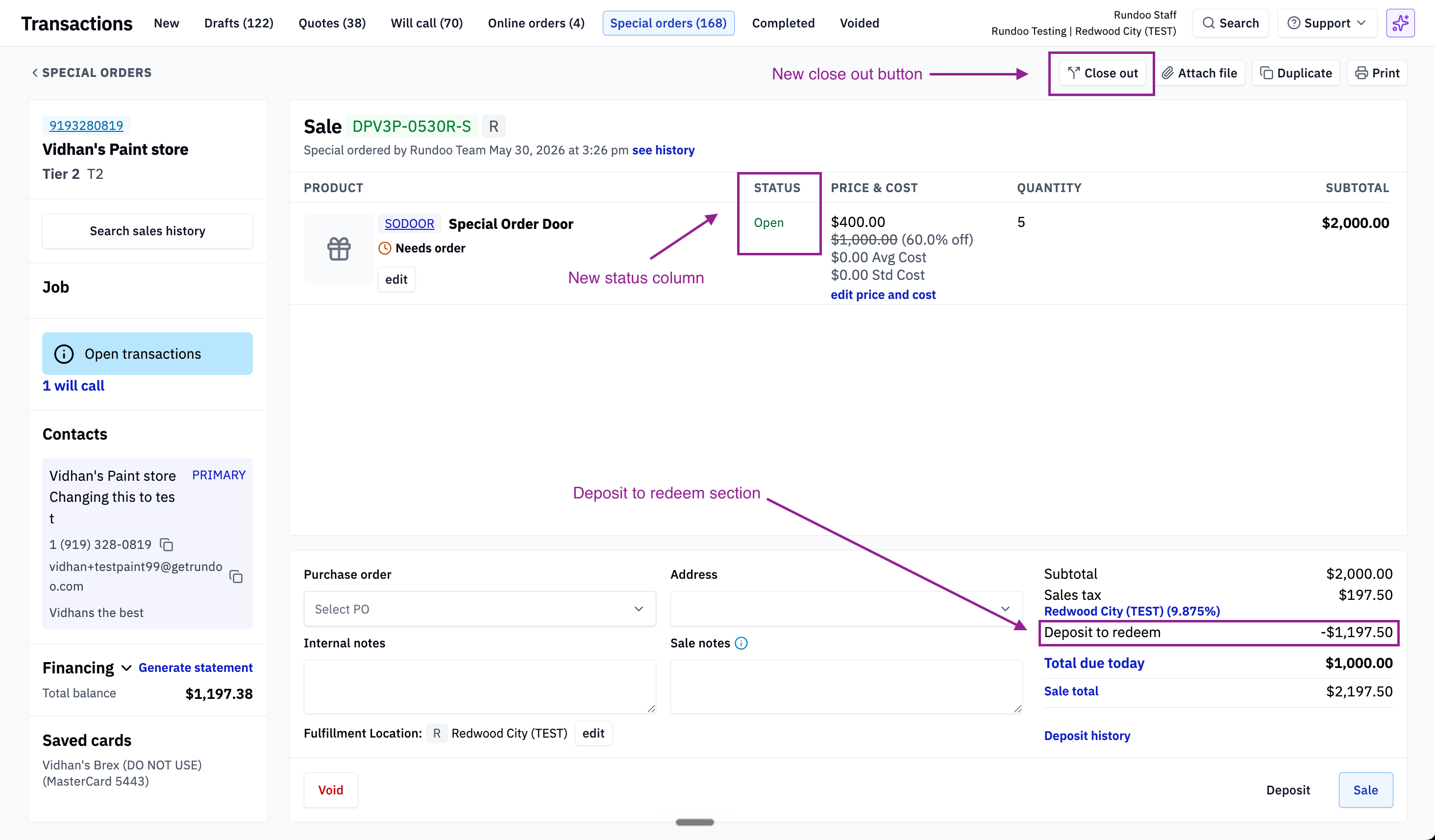
One special order can pull from several vendors. Say a contractor orders framing lumber from one supplier, a set of windows from another, and custom doors from a third. It is all on one ticket. The customer puts down a deposit on the whole order up front. Each piece comes in and goes out on its own schedule. The lumber arrives first and the crew is ready to start framing, so you close out the lumber and pull part of the deposit toward it. The windows come next, so you close those out and draw down more of the deposit. The custom doors have a long lead time, so you leave them open until they show up.
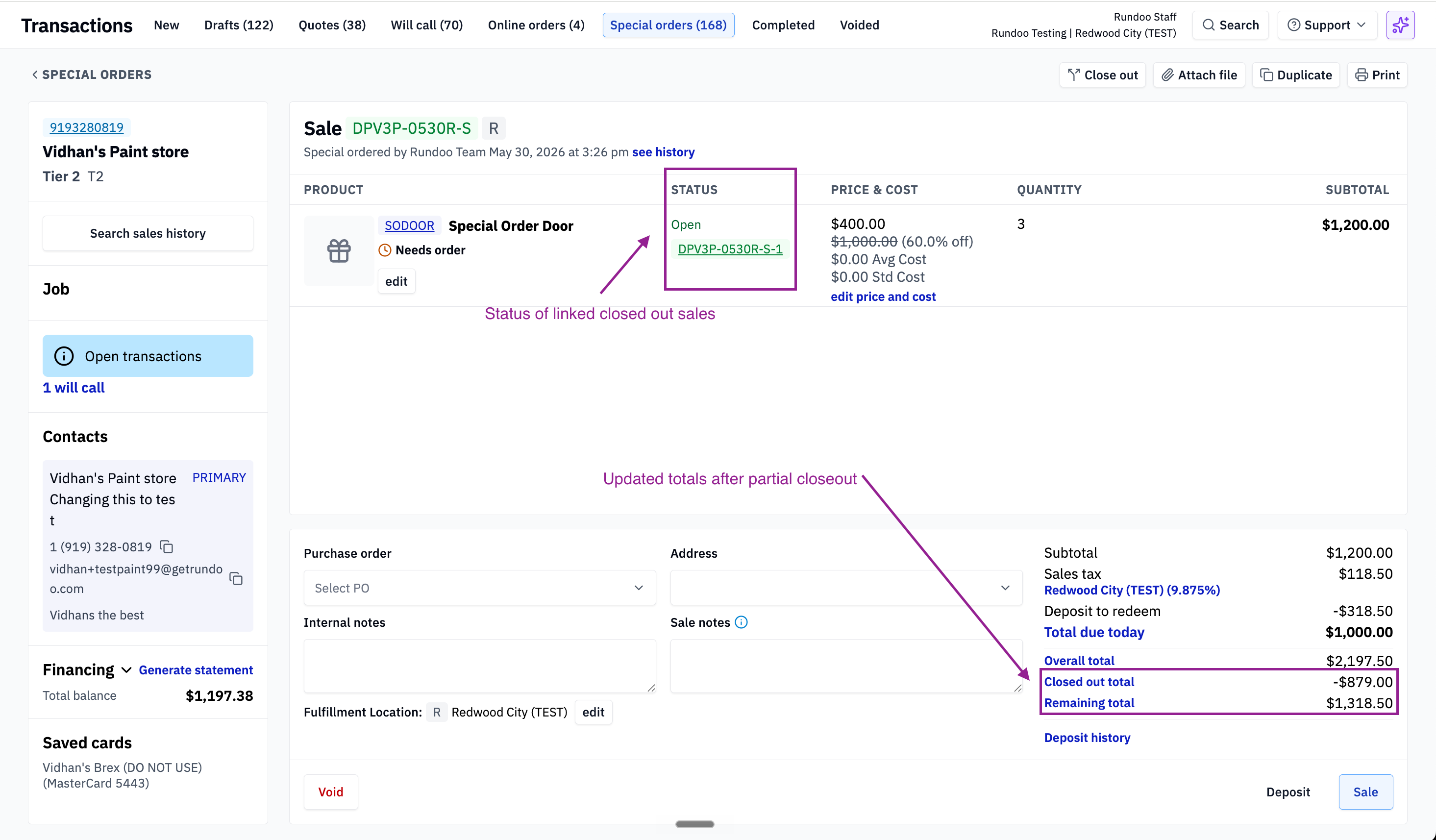
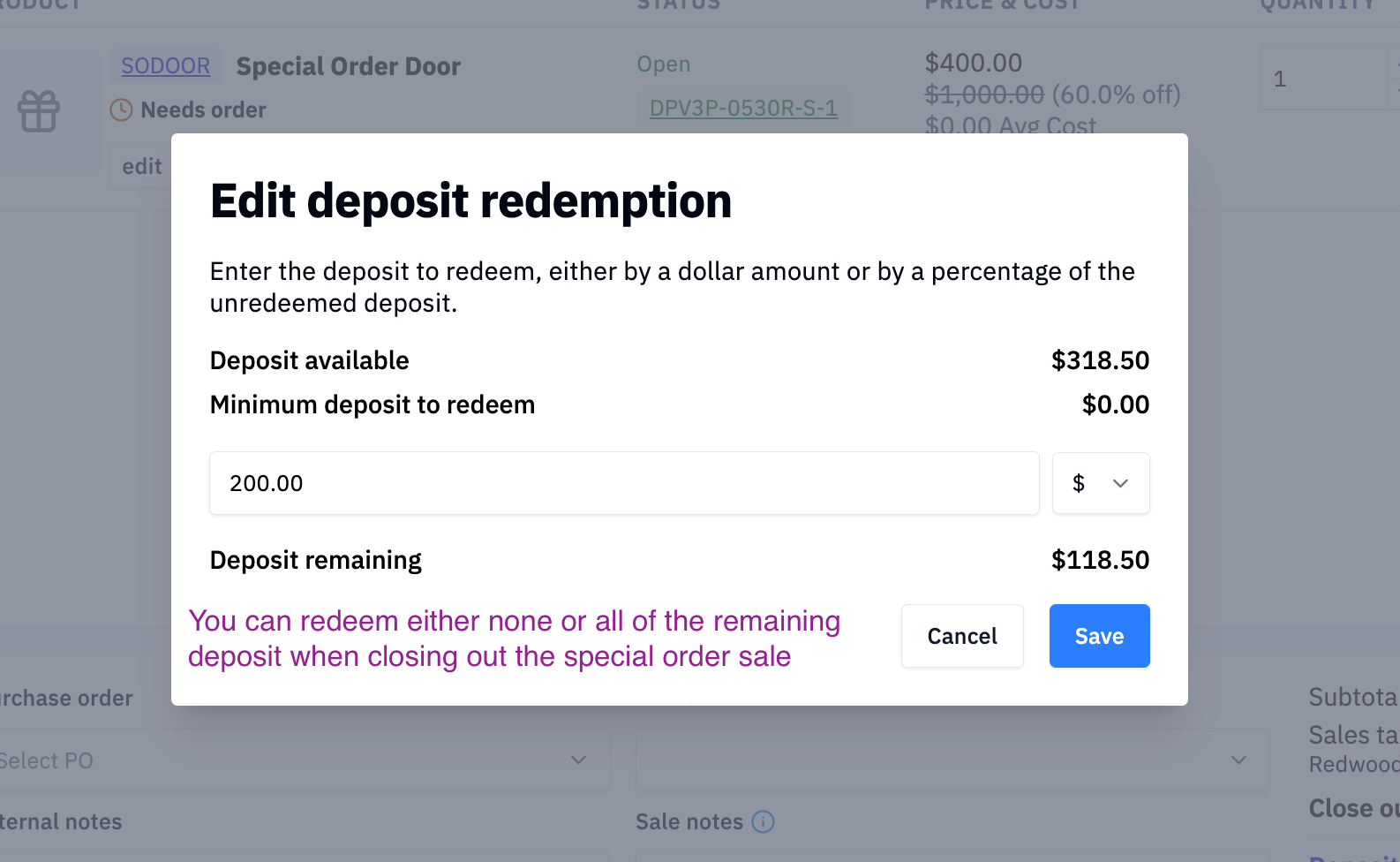
That deposit is yours to work with the whole way through. You apply as much or as little of it as you want on each closeout. If a piece costs more than what’s left, you can collect the difference right then. So one deposit can carry across every closeout on the order.
Farm and feed works the same way. A rancher orders T-posts, a roll of field fence, and a stock tank on one ticket. The customer wants the posts and fence now but isn’t ready for the tank yet. Close out the posts and fence. Keep the tank on the order for later.
Here is how to do it. Open the special order. Click Closeout in the top right. Pick the quantity of each product you want to close out. To set how much of the deposit goes toward those items, click Deposit to Redeem and enter an amount. Once you close out, Rundoo creates a regular Sale for the items you closed out. It links back to the original special order, so you can jump between the two for easy reference.
Why is this important?
You stay in control of the timing and the money. Vendors ship on different schedules, and customers take their pieces when it works for them. Now you can close out each item at the right moment instead of holding the whole order hostage to the slowest piece. The deposit moves with you too. Take it once up front, then draw it down piece by piece and top it up if a closeout runs higher. Your records stay clean, since each closeout becomes its own regular sale that links back to the order. No more tracking partial deliveries on a sticky note.
What does this look like?
Shoutout to the team that built this: Umer, Ozair, Kyle, and Ethan. 🙌
🏷️ Pricing by Region
What is new with Rundoo?
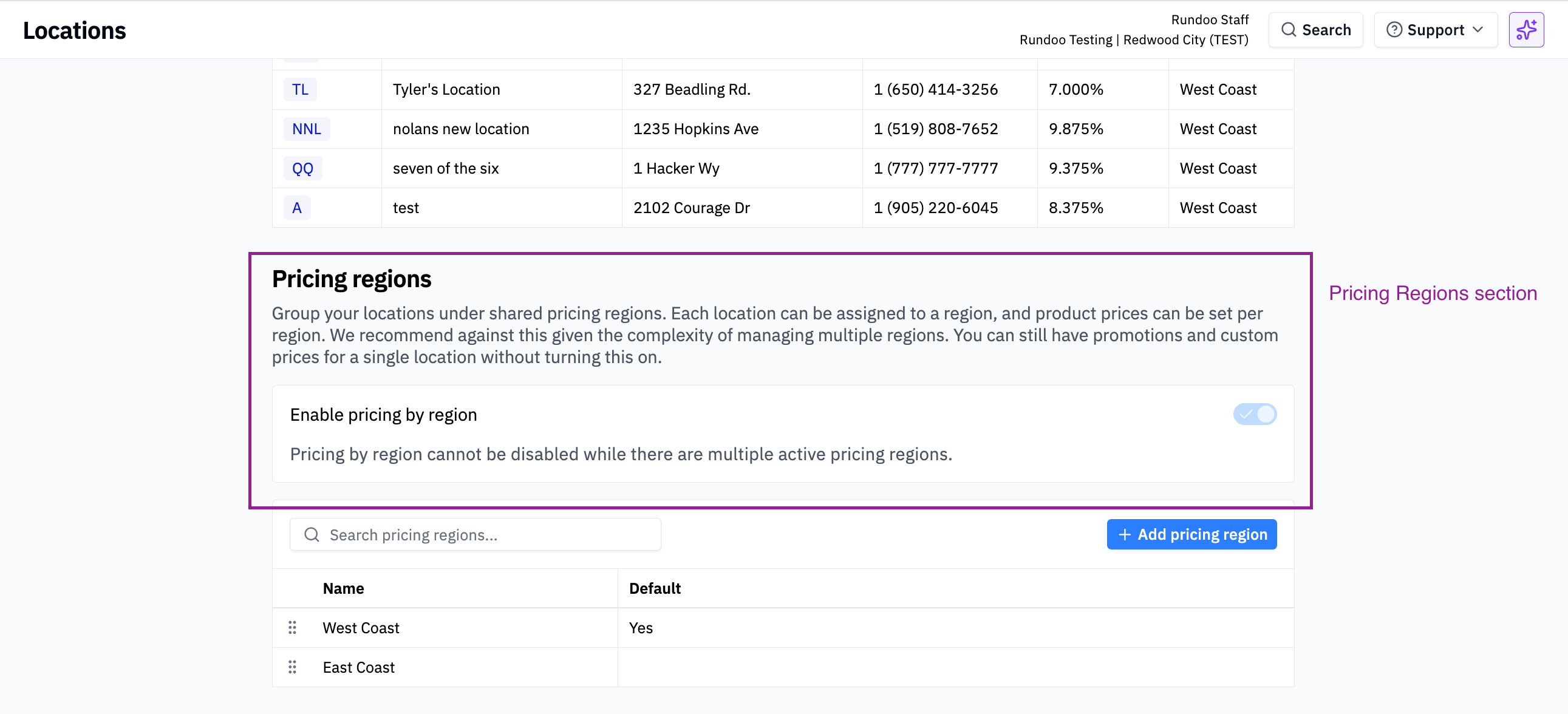
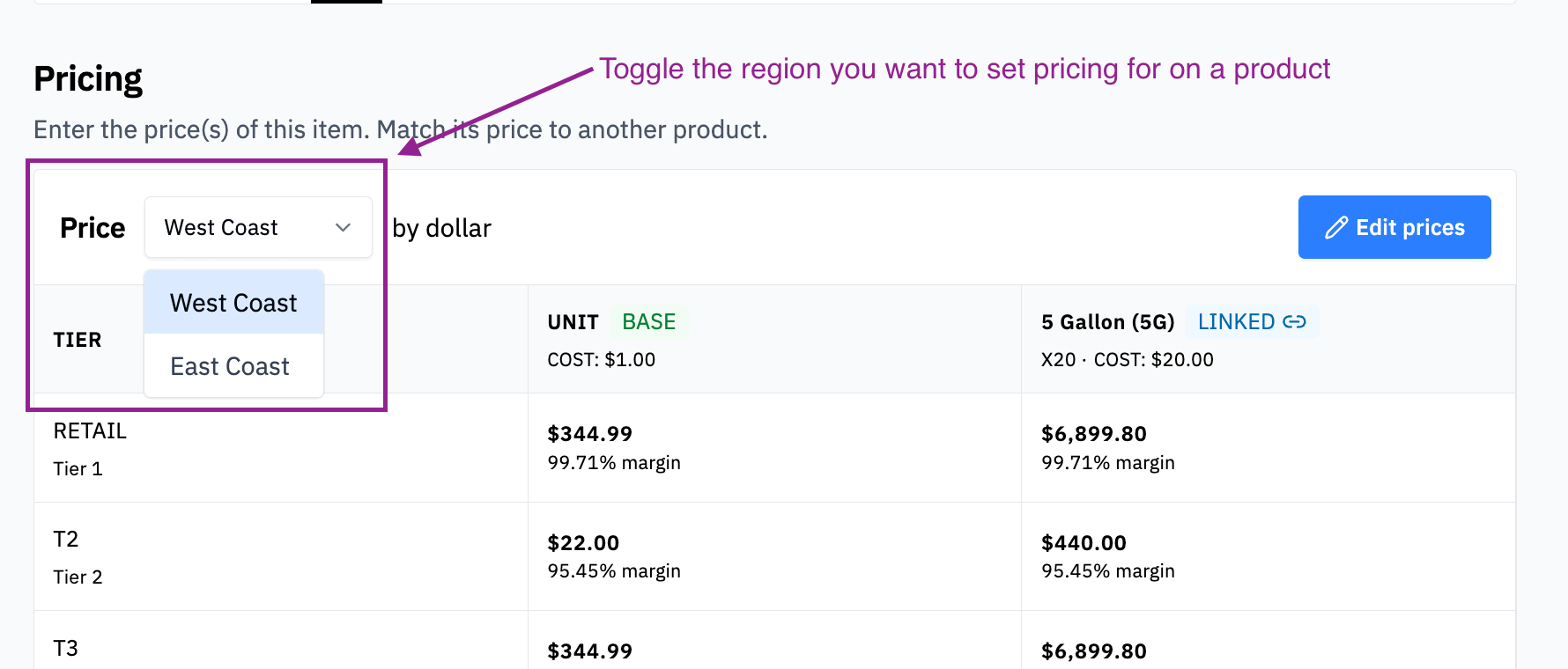
If you have more than one location, you can now price products by region. Before, every location shared the same price, and there was no way to charge different amounts at different stores. Now you can group your locations into regions and set prices for each one.
What does this mean?
Picture three hardware stores. Two sit in small towns. One is downtown, where rent runs higher and so does the going rate. You can put the two small-town stores in one region and the downtown store in another. Then you can charge a bit more for a roll of rope or a box of deck screws downtown, while keeping the small-town price lower.
Farm and feed works the same way. Maybe a bag of feed costs more to truck out to your rural store. Put that store in its own region and price the feed to match.
Here is how to set it up. Go to Admin → Locations. First, turn on pricing by region. Next, create your regions and give each one a name. Then click into each location and connect it to a region. That is it. Your regions are ready.
After that, you set prices per region on each product. For every manual price tier, you can now enter a price for each region.
One note. If you use rule-based pricing, region rules for pricing tiers are on the way. For now, region pricing works with manual price tiers.
Why is this important?
Markets are not the same from town to town. Your competition, your costs, and your freight can all change by location. This lets your prices follow your business instead of forcing one price everywhere.
What does this look like?
Shoutout to the team that built this: Santi, Vidya, and Jordan. 🙌
🔁 Also New: Skip the Note on Returns
We added a toggle that lets your team skip the note on returns. Go to Admin → Security and turn on Allow Returns without a sale note. With it on, your staff will not need to type a note on any transaction that includes a return. Handy if the note box was slowing your team down at the register. Shoutout to Jonathan for building this one. 🙌
Questions? Email us at support@rundoo.ai.
Have an idea for Rundoo? Add it to the board at rundoo.nolt.io.
Want the full how-to? Visit rundocs.com.