🪙 Rounding is now in your hands!
Round up, round down, or round to the nearest nickel. 🔄🏪

✨At a Glance
Many clients wanted the ability to round on cash sales, with some needing to, given the lack of pennies in circulation📉💰. Up until now, there was a manual workaround🛠️, and we knew that we needed to do something to change that. Now, with Cash Rounding built out, each store gets to choose how they use this feature.
This week I will go through:
💡 the reason for building this
💸 the impact of enabling this on each transaction
⚖️ how Rundoo will account for rounding in your general ledger
📝 a quick how-to
I will also include a demo video 🎥 and some walkthrough resources too 👀.
Also, if you keep reading until the end, there is an update to last week’s announcement on Tally Products! Continue on in this article to read all about it! 👇
🙌 Big shout-out to Rebecca for leading the charge on Cash Rounding with Santi, and to Yen-Ning for building this out. (And to Jiwon for the updated functionality for Tally Products!)
🤔 Why would I want to enable Rounding?
Pennies are becoming a thing of the past - you may have noticed fewer of them appearing in your store. So why is this, you might ask? Let me go through the reasons:
The Penny Shortage: Back in November 2025, the US Mint struck its last penny. (Keep that one in your back pocket for the next episode of Jeopardy or maybe the next Trivia Night🧠.)
🧐 Did you know that pennies cost more to make than they are worth? It cost the U.S. Mint roughly 3.07¢ to 3.79¢ to produce and distribute a single one-cent coin.
State-Level Shifts: Since 2025, 19 US states have adopted cash-rounding strategies to adapt to a post-penny world. With 2 more states awaiting a governor’s signature on similar guidelines!
The takeaway: stores had fewer and fewer pennies in their tills and so they needed to be able to round on cash sales to keep their books accurate, their receipts tidy, and their customers smoothly moving through their transactions.
🪙 Sold! I want to enable Rounding. How do I go about it?
We love an easy, intuitive system here at Rundoo. This is no different. To enable this it is a one-time set up per location.
Before you dive into setting this up, it is a good idea to consider which Cash Rounding Strategy you are going to use. The image below shows what each choice means.
⚠️Note: Make sure to check state and local laws on rounding before enabling this feature as the regulations differ.
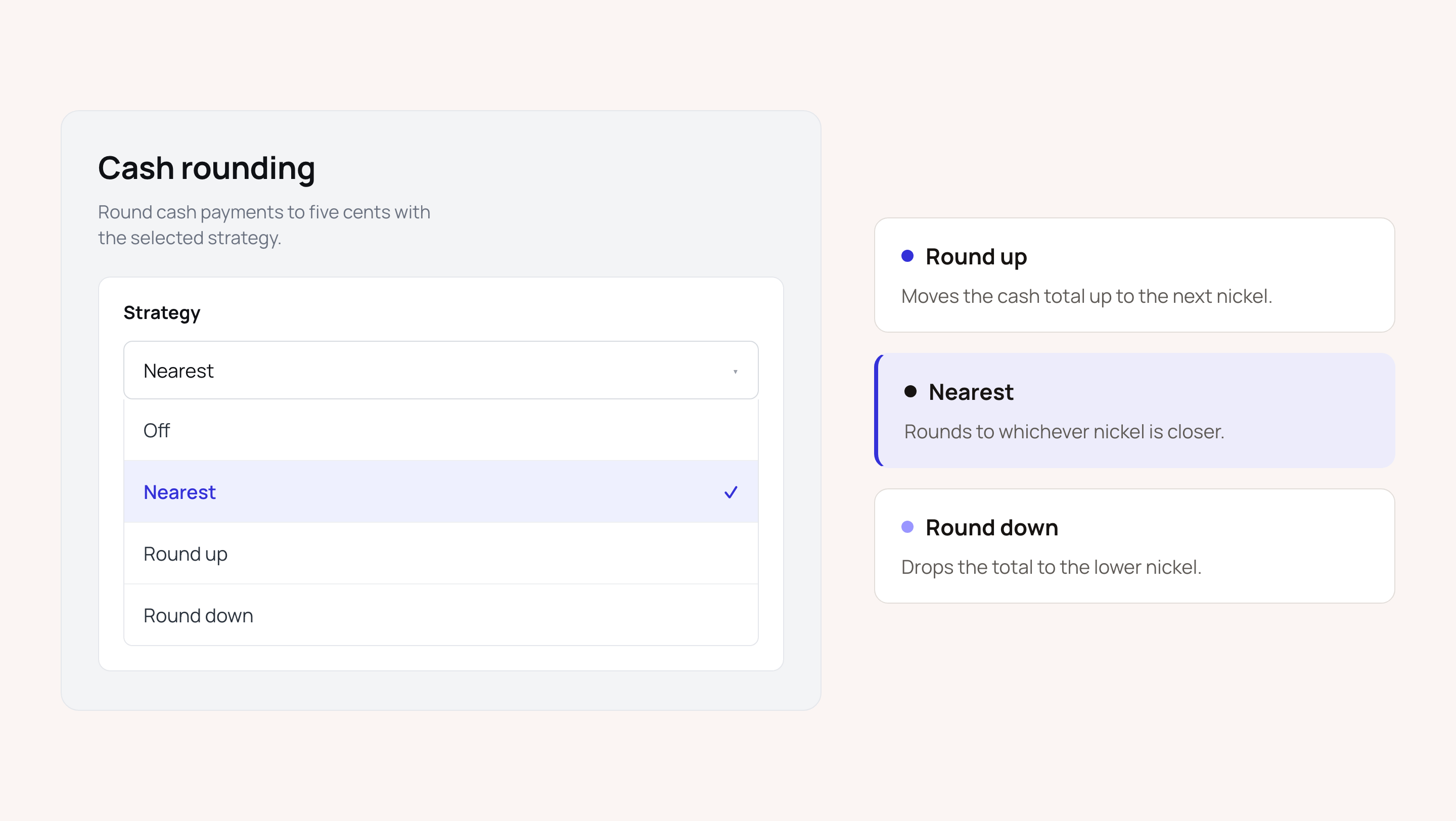
Once you have figured that out, you can set this up by following these steps:
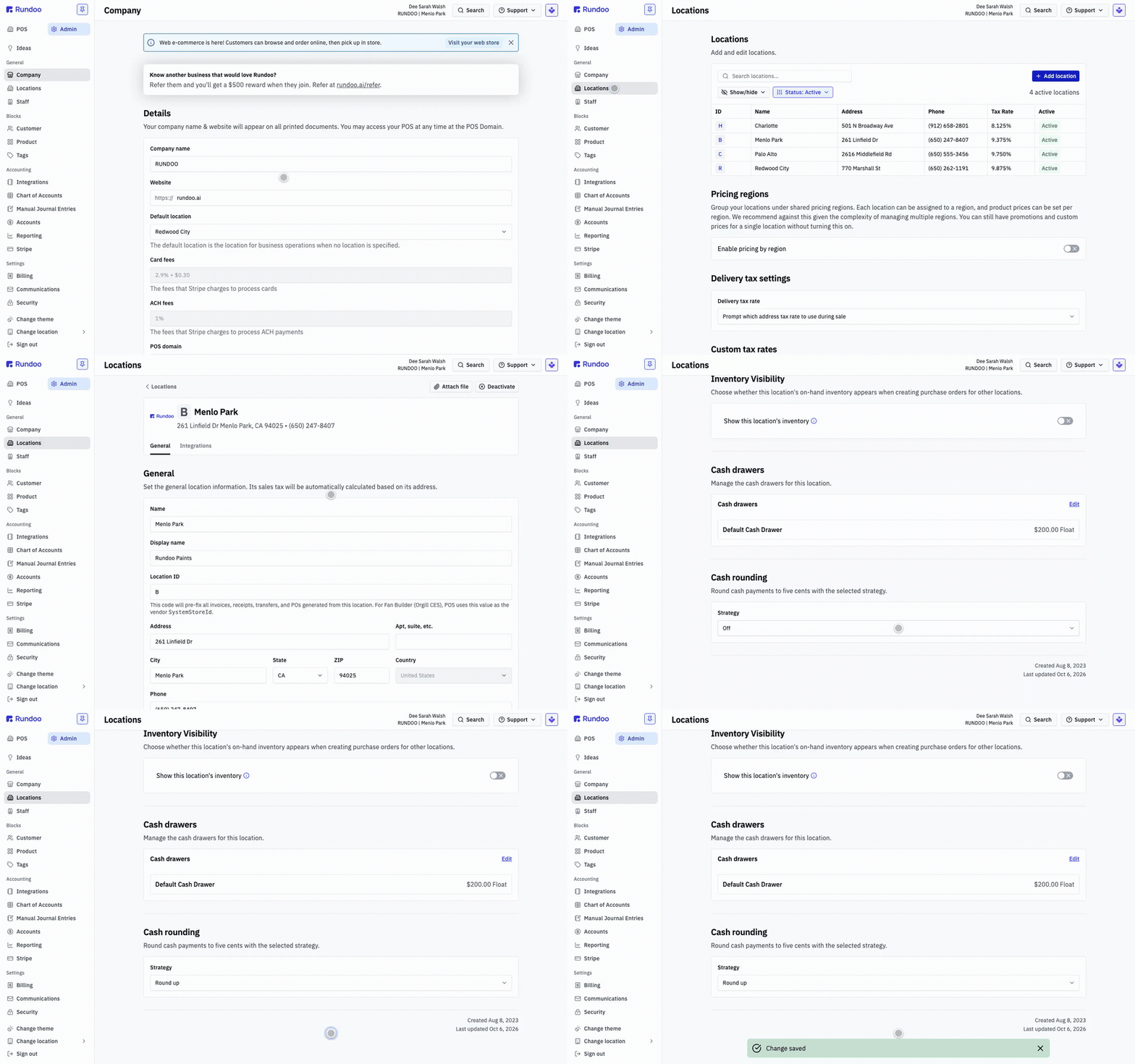
Click on Admin
Click on the Locations tab
Click on the store you want to enable Rounding in (you will need to do this setup for each store)
Scroll all the way down to the bottom (under the Cash Drawers section) to Cash Rounding
Under Strategy make your choice.
The gif below shows how to enable this from start to finish.
Now that I have setup Rounding, how will this look on a transaction?
Firstly, it is important to remember that cash rounding only impacts cash transactions. So payments on cards, checks, or charge accounts do not have their totals rounded. That means that on a transaction the total will appear without the rounding until you choose Cash as the payment method.
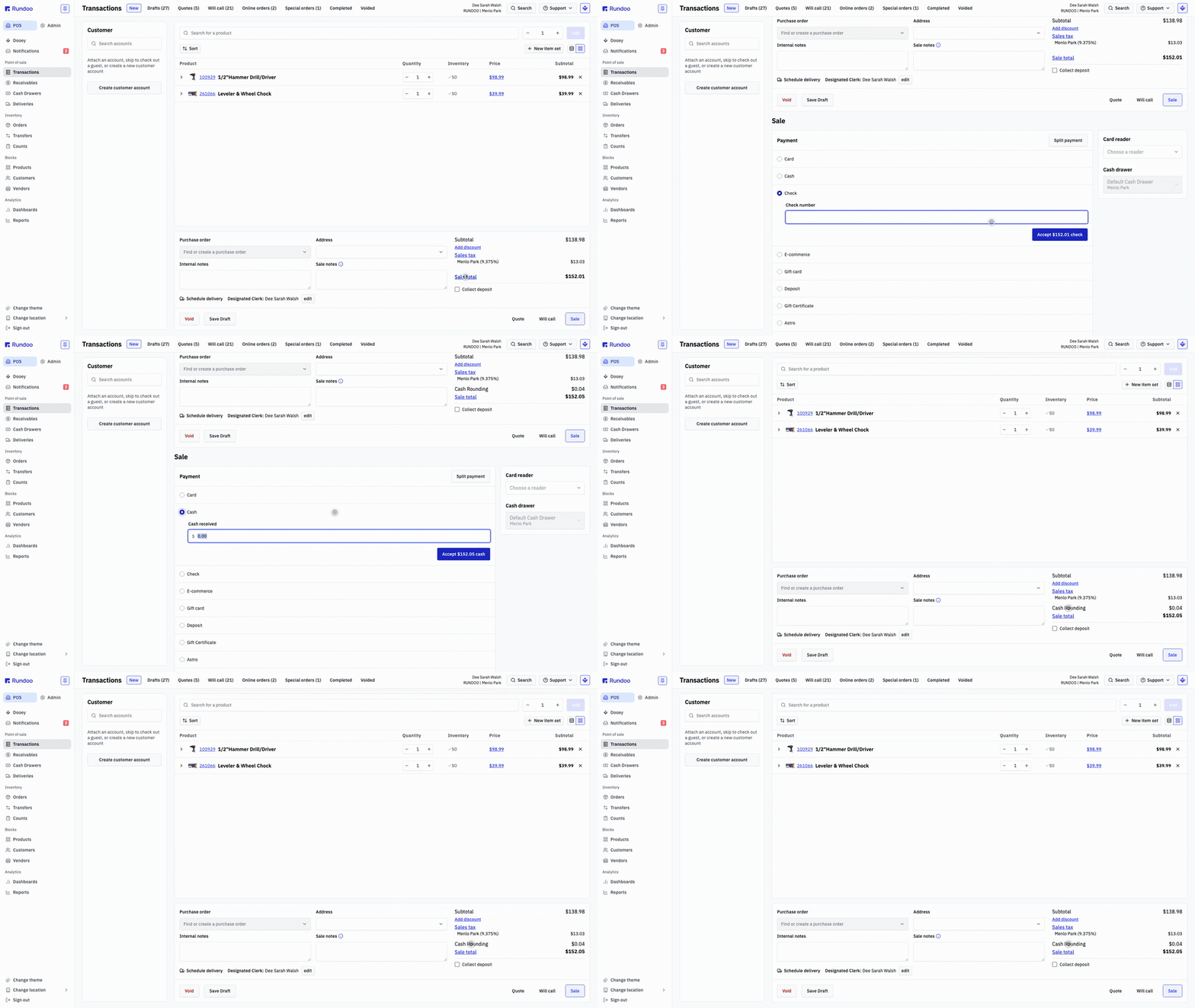
When you do click Cash, you will see an additional line above Sale Total called Cash Rounding that will show the amount rounded (either up or down), and the Sale Total will now reflect the rounded Sale Total. The demonstration above shows the transaction end to end.
📊 How would the transaction differ depending on the Strategy I choose?
The image below shows what this same transaction would look like for each Cash Rounding Strategy.

⚖️ How is Cash Rounding accounted for?
Great question! In your Chart of Accounts you should see an expense account for Cash Rounding.

If you enable cash rounding, this is where all rounded cash will be tracked, whether that is a small loss (when rounding down), a small gain (when rounding up), or the balance (gain - loss, when using the ‘nearest’ strategy).
🏁Tally Products Feature Addition
Ah, thank you for staying with me until the end. Last week, I shared the new feature Tally Products. Today, I am attaching a video showing some additional functionality that allows you to input fractional entries. This was a tricky build, as it connects to Units of Measure, specifically, the product’s stocking unit.
For example, if you want the ability to sell a Tally Product in Feet and Inches, you do this by:
Setting the stocking unit in Unit of Measure to feet.
In Tally Products > “Measure in Fractions”, select the correct fractional entry for the product. In my example, I want Feet & Inches so I set this to 1/12.
Once that is done, when you add that product to a transaction, the Tally Products module pops up asking you to input the specific feet and inches required.
On the receipt, the specific measurements will also be printed.
The images below show how I would set this up for a product where the stocking unit in Units of Measure is already set up as Feet. Try it out and let us know if you have any questions.
📝 Summary
Cash Rounding is here and in your hands to enable for your store. But this is not the only thing that went live this week, as you saw from the Tally Products update. Don’t forget to check out the idea board💡 for all of the other updates!
And, while you are there, if you have an idea of your own, add it to the board so we can start the process of figuring out how to make Rundoo work perfectly for you.
Thank you, as always, for reading. I hope you all have a fantastic week.
Dee 👋
Discussion about this post